How do I refund an order?
Refund some or all of an order from its side panel: pick the items and quantities, choose whether shipping goes back, and keep a restocking fee on a change of mind. Card orders go back through your Stripe; counter sales are recorded as money you hand back.
This guide is for store owners. Not you? Supplier guides
TL;DR: open the order in Sales → Orders, click Refund… in the side panel, pick the items and how many, check the preview, then confirm. You can refund part of an order now and more later. This works on orders your store sold under its own business. If btab sells on your behalf, btab handles the refund for you.
Which orders can I refund?
| Your store | Who refunds |
|---|---|
| You sell under your own business | You, from the order's side panel |
| btab sells on your behalf (most stores) | btab. The panel says "btab is the seller on this order — btab handles its refunds" |
A few orders stay with btab even when you're the seller: orders paid with (or selling) a gift card, and card payments btab collected for you. The panel tells you when that's the case.
An item supplied by someone else, like a btab catalogue supplier or a network supplier, shows refund via a return instead of a quantity box. Refund those through a return, so the supplier's side is sorted out properly.
How do I refund?
- Go to Sales → Orders and click the order.
- In the side panel, find Refunds and click Refund….
- Pick the Reason.
- Type how many of each item you're refunding. Each item shows how many are already refunded, and you can't go over what's left.
- Tick or untick Refund the shipping, and check the restocking fee (see below).
- For a counter sale, pick how you're handing the money back: Cash, EFTPOS, Card (your terminal) or Bank transfer.
- Check the preview: goods, shipping, restocking fee and the refund total.
- Click Refund $… and confirm.
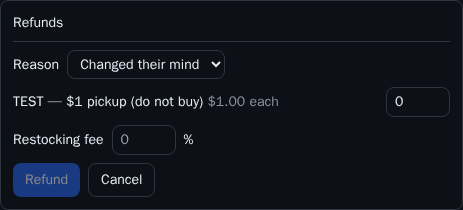
Each refund is listed in the box with its date, amount, items, any restocking fee kept and who did it. Once refunds add up to the whole order, the order is marked refunded.
Does shipping go back?
It depends on the reason, and you can always change it with the Refund the shipping tick box:
| Reason | Shipping refunded by default? |
|---|---|
| Changed their mind | No, you keep the original shipping |
| Faulty, arrived damaged, not as described, wrong item sent, other | Yes |
How does the restocking fee work?
A restocking fee only applies when the reason is Changed their mind. It's a percentage of the goods being refunded, taken off the refund.
Set your usual rate once in Sales → Returns → Restocking fee on change-of-mind refunds (a whole number from 0 to 100, and 0 to start with). It's pre-filled on every change-of-mind refund, and you can change it for that one refund.
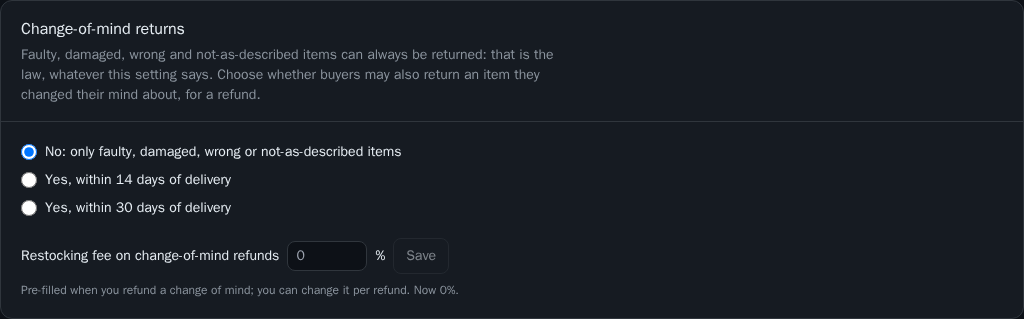
For example, a customer changes their mind about one of two chairs at $450 each, and your restocking fee is 20%:
| Goods (1 chair) | $450.00 |
| Restocking fee (20%) | −$90.00 |
| Shipping | kept |
| Refund | $360.00 |
Where does the money go?
- Paid by card through your Stripe account: the refund goes back to the customer's card through your Stripe. btab gives back its fee in proportion to the goods you refund, and the preview shows how much. The fee on a restocking fee you keep stays with btab.
- Paid at the counter or by bank transfer: nothing is charged or sent. The refund is recorded as money you hand back, with the method you picked.
What if I refund in my own Stripe dashboard?
That's fine. When you refund a charge in Stripe directly, btab picks it up and records it on the order, marked refunded in your Stripe, so your records still add up. A full refund in Stripe marks the order refunded. Refunding from the btab panel is still the better way, because it records which items and returns btab's fee share in the same step.
Why can't I click Refund?
- "Your role does not allow this": refunding needs a login that can change orders. Ask the store owner. See staff logins.
- No Refund… button: the order isn't paid yet, or it's already refunded in full.
What this means for you
- Set your restocking fee in Sales → Returns if you charge one on change-of-mind returns.
- Refund from the order's side panel rather than straight in Stripe, so the items and btab's fee are handled for you.
- For items another supplier sent, use Returns.